
A small Java library for Postgres LISTEN/NOTIFY
Get rid of Hazelcast for cross-instance cache invalidation
▸More posts (7)
For a while serverless was all the rage back at work. Lambdas, DynamoDB and SQS queues. Define all infra with typescript using CDK , and you never have to think about scaling again. Well, apart from the obvious question of cost; latency, DX and observability suffered too. So now, we try to take a more balanced approach. Some server applications that receive constant load 24/7 are better suited for good ol' EC2 instances. Of course, you still might want to allow for scaling. And to facilitate redudancy and no disruptions during deploys, you'll want to run your micorservice on at at least two instances. If your application is under heavy load and need to look things up in a database, you'll eventually turn to a cache. You might go with a central one in Redis, but that means additional cost and complexity. Or you stick with in-memory caches on each instance, but then how do you make sure to keep them in sync if an entry is updated on just one of the instances (through a JMS message arriving on an Artemis queue for example)? You need some kind of cross-instance notification system. Historically, what we reached for in our team was Hazelcast; "an open-source, distributed in-memory data grid and stream-processing platform designed for real-time, low-latency data storage and high-throughput computations across a cluster of nodes". That is quite a mouthful, and it is equally heavy to bring into your java application if all you need it for is its notification system. It not only consumes a lot of memory, setting up node discovery is non-trivial, especially if you run your Java application in a docker container on the VM. So, is there something simpler that we can use? Yes, there is, atleast if your application is already using a postgres database.
PG LISTEN/NOTIFY
Postgres has a built in mechanism for allowing one session to send messages to another session using pure SQL syntax, supplying a channel identifier and a payload.
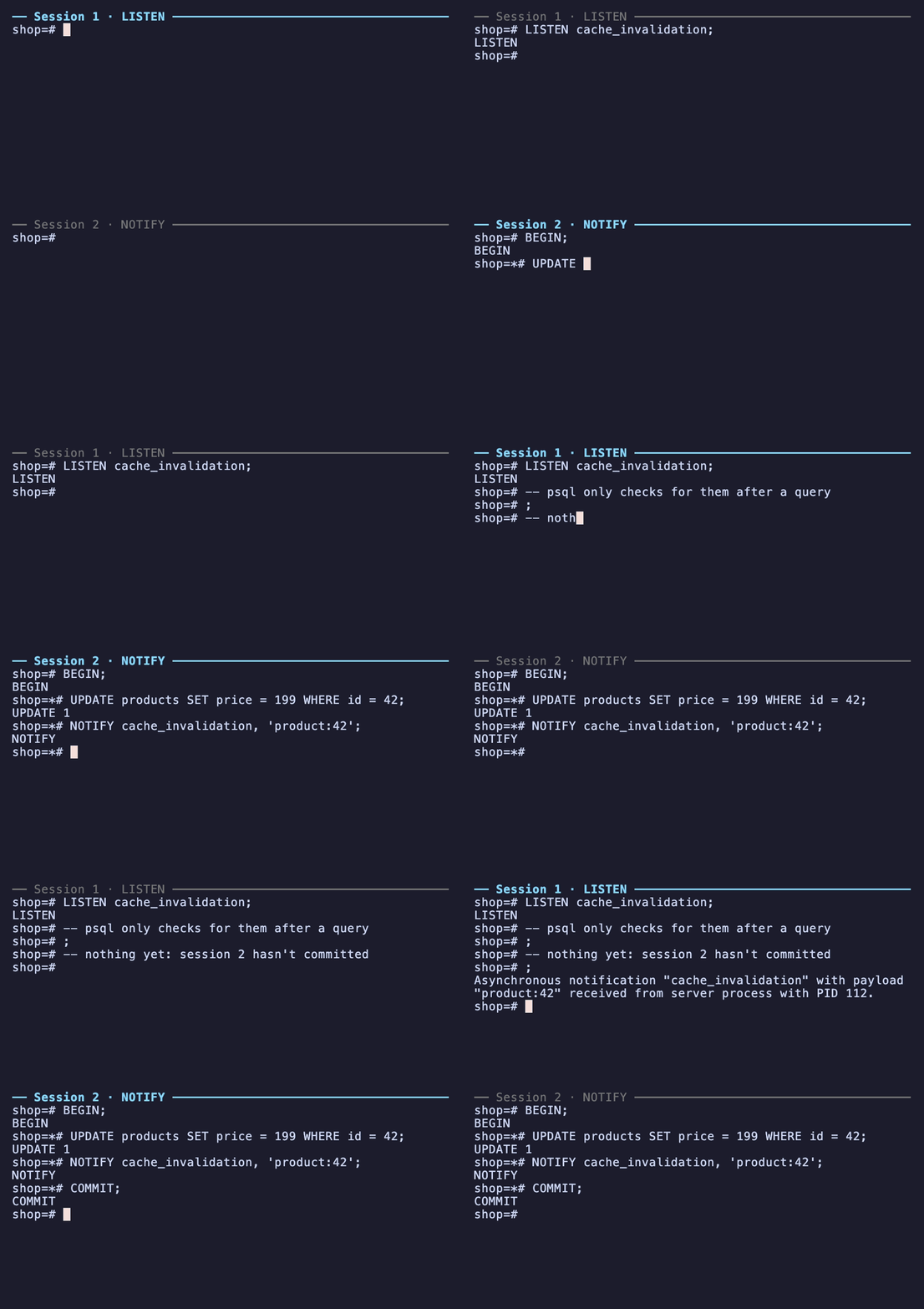
To get going with this functionality in Java, at the lowest level you can make use of the core library SQL primitives. A plain java.sql.Statement for LISTEN and java.sql.PreparedStatetment for NOTIFY. Both of these require a java.sql.Connection. In addition to this, we make use of the official org.postgresql:postgresql artifact to unwrap org.postgresql.PGConnection from the aforementioned Connection. This allows us to poll for org.postgresql.PGNotification using PGConnection.getNotifications(int timeoutMillis). Simple right?
Footguns
There are a few rough edges to be aware of before you start your own implementation.
Dedicated connection for the listener
It is likely that if you have a Postgres database in a Java application, you will make use of a com.zaxxer:HikariCP for database connection pooling. This vastly increases the performance of your database interactions by avoiding the overhead of setting up a connection per request (which is very expensive), keeping the Postgres backends warm with their caches intact, and by capping concurrency during traffic spikes. You might be tempted to pass one of those pooled connections to your listener abstraction. But that would be a mistake because LISTEN is tied to the session, and a pool exists to share sessions. If you hand it back between polls, the borrower will inherit its subscriptions and its unread notifications. Notifications sent while the borrower is in transaction are delayed. If on the other hand the listener never returns the connection, HikariCP will flag it as a leak, and you will have shrunk your pool size by one for no reason. So give your listener its own connection and make sure it is in autocommit (otherwise nothing gets delivered).
Silently dropped connections
There are several factors that can make your listener lose its connection. For example, a database connection rides on top of TCP, which is suceptible to NAT state timeouts. This could silently kill your connection if it sits idle for too long. Therefore it is incumbent on any implementer to build reconnect logic and restore session state (you might have many channels being listend to). On the proactive side, implementing your own keep alive functionality by running a scheduled SELECT 1 query will reset the TCP idle timeout in NAT gatways and act as a health check at the same time. Just remember to give your health check a network timeout because dead connections can block forever.
At most once delivery
Messages are sent at most once. There are no acknowledgements to facilitate redelivery, and if a notification is sent while your listener is down, it will be lost forever (ie. no persistance). It is therefore important to measure the downtime when a connection loss is detected, and make that information available in a callback when connection is restablished. If the notification system is used for cache invalidation for example, you might reload any record that was modified since disconnectedAt. This allows you to to recover gracefully and clean up stale state.
PgBouncer and similar poolers
On a related note, dedicated poolers in front of the database like PgBouncer will break the listerner functionality unless configured for session pooling mode. If in transaction or statement pooling mode, it will not work because your listener must stay attached to the underlying postgres connection while it polls (which it does indefinitely on a loop). But pgBouncer in transaction mode will hand back the postgres connection to the pool immediatly after your LISTEN autocommits, which means you will not reliably receive notifications. In such a case you must connect directly to Postgres with your listener. Be assured that NOTIFY works in any mode because the notification runs in a transaction, and thus pgBouncer will attch you to a postgres connection.
Introducing Dockside Labs's pg-notify
If you don't want to build all this logic yourself while navigating the above footguns, you can instead make use of se.docksidelabs.pgnotify. This is newly developed library which should make it straight fowrward to get started. Just add the following dependency to your pom.xml:
<dependency>
    <groupId>se.docksidelabs</groupId>
    <artifactId>pg-notify</artifactId>
    <version>0.1.0</version>
</dependency>
Or if you prefer gradle:
implementation("se.docksidelabs:pg-notify:0.1.0")Listener
Listen by making use of the PgListener utility:
try (PgListener listener = PgListener.builder("jdbc:postgresql://db/app", props)
        .listen("products", notification -> cache.invalidate(notification.payload()))
        .onReconnect(event -> cache.invalidateAll())
        .build()) {
  listener.start();                                     // non-blocking; connects on its own thread
  listener.awaitListening(Duration.ofSeconds(10));      // optional startup gate
  // ... run your service ...
}                                                       // close() stops the thread and the connection
You can supply multiple handlers for your different channels that run on a separate thread compared to the listener. There is also an option to supply your own threadpool for the handlers. Within one channel, order is always preserved.
PgListener listener = PgListener.builder(url, props)
    .listen("orders", notification -> orderCache.evict(UUID.fromString(notification.payload())))
    .listen("customers", notification -> customerCache.evict(notification.payload()))
    .listen("config", notification -> settings.reload())   // payload unused
    .onReconnect(event -> { orderCache.clear(); customerCache.clear(); settings.reload(); })
    .build();
Or subscribe after the start() has been called:
Subscription sub = listener.listen("tenant_" + tenantId, notification -> tenantCache.evict(tenantId));
sub.close();   // removes the handler; UNLISTEN once the channel has no handlers left
Publish
Publish to a channel using the PgNotifier utility.
// plain JDBC
try (Connection c = dataSource.getConnection()) {       // your normal, pooled connection
  c.setAutoCommit(false);
  update(c, productId);
  PgNotifier.notify(c, "products", productId);          // delivered on commit, dropped on rollback
  c.commit();
}

// Jdbi: the handle's connection is the transaction's connection
jdbi.useTransaction(handle -> {
  handle.createUpdate("update products set price = :p where id = :id")
      .bind("p", price).bind("id", productId).execute();
  PgNotifier.notify(handle.getConnection(), "products", productId);
});

// Spring Data JPA with Hibernate: doWork runs on the connection the transaction is using
@Transactional
public void reprice(UUID productId, BigDecimal price) {
  Product product = products.findById(productId).orElseThrow();
  product.setPrice(price);
  entityManager.unwrap(Session.class)
      .doWork(connection -> PgNotifier.notify(connection, "products", productId.toString()));
}
Sending records as JSON
The payload is a string, so a structured message is whatever you serialise into it. With Jackson and a record:
record PriceChanged(UUID productId, BigDecimal price) {}

ObjectMapper mapper = new ObjectMapper();

// publish
PgNotifier.notify(connection, "prices", mapper.writeValueAsString(new PriceChanged(id, price)));

// listen
.listen("prices", notification -> {
  PriceChanged change = mapper.readValue(notification.payload(), PriceChanged.class);
  priceCache.put(change.productId(), change.price());
})
Or build your own typed channel:
record Channel<T>(String name, Class<T> type) {
  void notify(Connection c, T value) throws SQLException, JsonProcessingException {
    PgNotifier.notify(c, name, mapper.writeValueAsString(value));
  }
  Subscription listen(PgListener listener, Consumer<T> handler) {
    return listener.listen(name, n -> handler.accept(mapper.readValue(n.payload(), type)));
  }
}

static final Channel<PriceChanged> PRICES = new Channel<>("prices", PriceChanged.class);

PRICES.notify(connection, new PriceChanged(id, price));
PRICES.listen(listener, change -> priceCache.put(change.productId(), change.price()));
Wrapping up
For us, NOTIFY/LISTEN helped us get rid of Hazelcast with something the database gave us for free. It isn't a message broker, so if you need redelivery and persistance garantees this isn't for you. But if you need something lightweight to keep in-memory caches in sync across instances, then go ahead and try this library out.
By the way, the GIF above was produced fully autonomously by Claude, using VHS to script and record a headless terminal, tmux for the two stacked psql sessions, and a throwaway Postgres in Docker. Pretty amazing if you ask me (I'm so glad I didn't have to do that manually).